WaDesk | AI-Powered Omnichannel, Bulk Messaging Flutter App
WaDesk | AI-Powered Omnichannel, Bulk Messaging Flutter App
About this product
<p><strong>Hello!</strong></p>
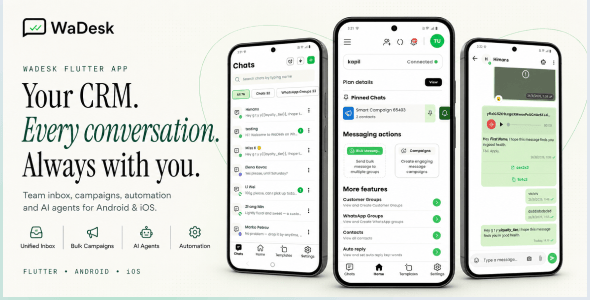
<p><strong>WaDesk</strong> is a modern mobile client built with <strong>Flutter + Dart</strong> for managing business conversations, campaigns, contacts, automation, and customer communication from Android and iOS devices.</p>
<p>The app connects with the WaDesk web platform through its REST API and provides a mobile-first workspace for handling conversations, connected devices, message templates, scheduled campaigns, automated replies, customer groups, subscriptions, payments, and more.</p>
<p>It is designed for marketers, agencies, freelancers, sales teams, e-commerce businesses, and SaaS operators who want to manage their communication workflow from a single mobile application.</p>
<hr>
<img src="res.cloudinary.com/mediacity/image/upload/v1788169000/WaDesk/app/01-wadesk-app-license-pricing…" alt="WaDesk Mobile App">
<h3>App Demo</h3>
<p><a href="wadesk.mediacity.co.in/mobile-app" title="WaDesk App Demo"><img src="res.cloudinary.com/mediacity/image/upload/v1784871224/emart/app/post-15.jpg" alt="WaDesk App Demo"></a></p>
<p><strong>Username:</strong> [email protected]<br>
<strong>Password:</strong> 12345678</p>
<hr>
<h3>Required Web Version</h3>
<p>This mobile application works as a client for the WaDesk web platform and <strong>cannot operate independently</strong>. The web version must be purchased and installed separately before using the mobile application.</p>
<p>The mobile app communicates with the web platform through the provided REST API.</p>
<p><strong>Required Web Version:</strong> <a href="codecanyon.net/item/wadesk-saas-aipowered-whatsapp-crm-automation-chatbot-builder-and-bulk-messenger/63755235">WaDesk SaaS Web Version</a></p>
<hr>
<h3>Important — Third-Party Services & Additional Costs</h3>
<p>Some functionality depends on external services such as <strong>Meta WhatsApp Business API (WABA), Twilio, compatible messaging providers, AI providers, and payment gateways</strong>.</p>
<p>Supported external services may include OpenAI, Anthropic, Gemini, Stripe, Razorpay, PayPal, Paystack, and Flutterwave. These services require separate accounts and may involve additional charges.</p>
<p>This item does <strong>not</strong> include third-party API keys, credits, subscriptions, phone numbers, or service fees. All external service costs are the responsibility of the buyer.</p>
<hr>
<h3>Who Is WaDesk For?</h3>
<ul>
<li><strong>Marketers & Growth Teams:</strong> Create campaigns, organize audiences, use reusable templates, and manage communication from a mobile device.</li>
<li><strong>Agencies & Freelancers:</strong> Work with multiple client workspaces, connected devices, campaigns, subscriptions, and billing information.</li>
<li><strong>E-commerce & D2C Brands:</strong> Handle customer conversations, order-related updates, promotions, and personalized messages.</li>
<li><strong>Sales Teams:</strong> Keep frequently used messages and customer conversations accessible for faster follow-up.</li>
<li><strong>SaaS Businesses & Founders:</strong> Provide customers with a mobile communication client connected to the WaDesk web platform, including plans, billing, credits, and CMS functionality.</li>
</ul>
<hr>
<h3>Key Features</h3>
<h4>Workspaces</h4>
<ul>
<li><strong>Multi-workspace:</strong> Belong to multiple workspaces and switch between them from the app.</li>
<li><strong>Create Workspace:</strong> Configure workspace name, industry, team size, and timezone.</li>
<li><strong>Workspace Scoping:</strong> API requests are scoped to the selected workspace using the <code>X-Workspace-Id</code> header.</li>
<li><strong>Workspace Contacts:</strong> Add, edit, delete, search, and manage contacts belonging to the active workspace.</li>
</ul>
<h4>Connected Devices & Channels</h4>
<ul>
<li><strong>Multiple Connection Methods:</strong> Connect through Meta WhatsApp Business API, Twilio, or the unofficial Baileys connection method.</li>
<li><strong>QR Pairing:</strong> Baileys devices are paired from the WaDesk web dashboard and then become available in the mobile app.</li>
<li><strong>Device List:</strong> View connected devices, numbers, names, and current connection status.</li>
<li><strong>Multi-device Support:</strong> Manage more than one connected device and switch between them.</li>
<li><strong>Live Status:</strong> Check the connection state before sending messages.</li>
<li><strong>Multi-channel Inbox:</strong> Conversations can be associated with WhatsApp, SMS, Facebook, Instagram, Telegram, Viber, WeChat, LINE, and TikTok.</li>
<li><strong>Channel-aware Actions:</strong> Available composer features and message actions automatically adapt to the capabilities of the selected channel.</li>
<li><strong>Read Status:</strong> Read indicators are displayed only for channels and connection methods that provide reliable read-state information.</li>
<li><strong>Server-Verified Sends:</strong> Failed messages display the reason returned by the server instead of showing an incorrect sent state.</li>
<li><strong>Pinned Queues:</strong> Keep frequently used broadcast queues accessible from the home screen.</li>
</ul>
<h4>Team Inbox & Real-Time Chat</h4>
<ul>
<li><strong>Unified Inbox:</strong> Access conversations, groups, broadcast queues, and customer groups from one interface.</li>
<li><strong>Real-Time Delivery:</strong> Receive incoming messages through Pusher / Reverb WebSockets with an automatic polling fallback.</li>
<li><strong>Quick Send:</strong> Start a one-to-one conversation using a country-code selector.</li>
<li><strong>Chat Details:</strong> View conversation history and respond directly from the thread.</li>
<li><strong>Media Attachments:</strong> Send images, videos, audio files, PDFs, and documents.</li>
<li><strong>Message Actions:</strong> Reply, forward, pin, star, delete, view information, and use reactions where supported by the active channel.</li>
<li><strong>Agent Indicators:</strong> Conversations handled by an automated agent display its name, status indicator, and optional quality rating.</li>
<li><strong>Forward Messages:</strong> Forward messages to supported chats, groups, queues, and customer groups.</li>
<li><strong>Emoji Picker:</strong> Use emojis directly inside the message composer.</li>
<li><strong>Archive:</strong> Archive and restore conversations from the dedicated archive screen.</li>
</ul>
<h4>AI Agents</h4>
<ul>
<li><strong>Automated Replies:</strong> Create agents that can draft and send responses within the team inbox.</li>
<li><strong>Multiple Providers:</strong> Support for OpenAI, Anthropic, Gemini, Mistral, DeepSeek, xAI, Perplexity, Groq, Qwen, Cohere, OpenRouter, and additional providers configured by the backend.</li>
<li><strong>Dynamic Model Selection:</strong> Available providers and models are loaded from the backend rather than being hardcoded in the application.</li>
<li><strong>Chat-based Setup:</strong> Create an agent from a conversation and configure its name, provider, model, tone, system prompt, token limit, temperature, and automatic response settings.</li>
<li><strong>Human Handoff:</strong> Configure keywords, maximum automated replies, and quality thresholds for transferring conversations back to a human.</li>
<li><strong>Voice Options:</strong> Optional voice notes and calling functionality can be configured when supported by the selected provider.</li>
<li><strong>Assign & Detach:</strong> Attach an agent to a conversation or remove it whenever manual handling is required.</li>
<li><strong>Agent Management:</strong> Create, update, view, and delete workspace agents from the dedicated management screen.</li>
</ul>
<h4>Templates & Attributes</h4>
<ul>
<li><strong>Template Library:</strong> Create, edit, organize, and delete reusable message templates.</li>
<li><strong>Categories:</strong> Organize templates for faster access.</li>
<li><strong>Dynamic Attributes:</strong> Insert recipient-specific and custom attributes into message content.</li>
<li><strong>Template Types:</strong> Plain text, text with media, media templates, and text with location.</li>
<li><strong>Action Buttons:</strong> Add URL, phone-call, copy-code, and quick-reply actions where supported.</li>
<li><strong>Interactive Content:</strong> Support for carousel, poll, and list-based interactive payloads.</li>
<li><strong>Bulk Delete:</strong> Select multiple templates and remove them together.</li>
</ul>
<h4>Campaigns & Queues</h4>
<ul>
<li><strong>Campaign Creation:</strong> Select a template, audience, and schedule from one workflow.</li>
<li><strong>Audience Selection:</strong> Choose contacts, contact groups, or import recipients from CSV.</li>
<li><strong>Campaign Details:</strong> Monitor campaign progress and message counts.</li>
<li><strong>Pause or Stop:</strong> Stop an active campaign when required.</li>
<li><strong>Bulk Management:</strong> Delete or update multiple campaigns at once.</li>
<li><strong>Queue Management:</strong> View, rename, archive, pin, or delete broadcast queues.</li>
<li><strong>Queue Details:</strong> Monitor individual message and recipient status.</li>
<li><strong>Re-send:</strong> Add new recipients or messages to an existing queue.</li>
<li><strong>Live Status:</strong> View recipient and message progress from the backend status endpoint.</li>
</ul>
<h4>Scheduled Messages</h4>
<ul>
<li><strong>Schedule Individual Messages:</strong> Select a future date and time for a message.</li>
<li><strong>Schedule Campaigns:</strong> Set future delivery times for campaigns.</li>
<li><strong>Timezone Aware:</strong> Scheduling follows the device timezone.</li>
</ul>
<h4>Auto-Reply & Flow Builder</h4>
<ul>
<li><strong>Rule Management:</strong> Search and filter existing automatic response rules.</li>
<li><strong>Trigger-based Responses:</strong> Configure keyword-based replies using text, media, or flow-based responses.</li>
<li><strong>Flow Builder:</strong> Use backend-defined flows for multi-step automated conversations and campaign workflows.</li>
<li><strong>Bulk Delete:</strong> Remove multiple rules in one action.</li>
</ul>
<h4>Contacts & Groups</h4>
<ul>
<li><strong>Contact Management:</strong> Browse and search synchronized contacts.</li>
<li><strong>CSV Import & Export:</strong> Import contact data and export it for offline review.</li>
<li><strong>Contact Groups:</strong> Create, edit, and delete groups for audience organization.</li>
<li><strong>Bulk Group Delete:</strong> Remove multiple groups at once.</li>
<li><strong>Group Audiences:</strong> Select an entire contact group when creating a campaign.</li>
</ul>
<h4>WhatsApp Groups</h4>
<ul>
<li><strong>Group Manager:</strong> Create, view, and leave groups from supported Baileys-connected devices.</li>
<li><strong>Group Information:</strong> Edit group subject and description and view participants.</li>
<li><strong>Invite Links:</strong> Retrieve and share group invitation links.</li>
<li><strong>Group Chat:</strong> Send and receive group messages with archive and read-state support.</li>
</ul>
<h4>Plans & Subscriptions</h4>
<ul>
<li><strong>Active Plan Check:</strong> The application verifies the user's subscription after login and when the app starts.</li>
<li><strong>Plan Catalog:</strong> Display available plans with pricing, currency, and included features.</li>
<li><strong>Featured Plan:</strong> Show a highlighted plan on the home screen with direct access to its details.</li>
<li><strong>Plan Limits:</strong> Display message, contact, group, broadcast, and template limits.</li>
<li><strong>Coupons:</strong> Apply available discount codes during checkout.</li>
<li><strong>Purchase History:</strong> Review previous transactions and download invoices.</li>
<li><strong>Credits:</strong> Monitor remaining credits and usage against the active plan.</li>
</ul>
<h4>Wallet & Credits</h4>
<ul>
<li><strong>Dual Balance:</strong> Maintain message-credit and currency balances in the wallet.</li>
<li><strong>Top-Up:</strong> Add funds through supported payment gateways.</li>
<li><strong>Transaction Ledger:</strong> Review wallet credit and debit activity separately from plan purchases.</li>
</ul>
<h4>Payment Gateways</h4>
<ul>
<li><strong>Stripe:</strong> Card payments using PaymentSheet.</li>
<li><strong>Razorpay:</strong> Native checkout integration.</li>
<li><strong>PayPal:</strong> Integrated PayPal payment flow.</li>
<li><strong>Paystack:</strong> Embedded checkout.</li>
<li><strong>Flutterwave:</strong> Embedded checkout.</li>
<li><strong>Multi-currency:</strong> Pricing and currency information are supplied by the backend.</li>
<li><strong>Server Verification:</strong> Orders are verified by the server before a plan is activated.</li>
<li><strong>Runtime Configuration:</strong> Payment credentials are retrieved through the backend configuration endpoint rather than hardcoded into the application.</li>
</ul>
<h4>Authentication & Security</h4>
<ul>
<li><strong>Email & Password:</strong> Secure registration and login with password validation.</li>
<li><strong>Google Sign-In:</strong> Login using Google authentication.</li>
<li><strong>Facebook Sign-In:</strong> Login using Facebook authentication.</li>
<li><strong>Password Recovery:</strong> OTP-based password reset flow.</li>
<li><strong>Change Password:</strong> Update the account password from security settings.</li>
<li><strong>Two-Factor Authentication:</strong> Optional OTP-based second-factor authentication using the configured messaging channel.</li>
<li><strong>Passcode Lock:</strong> Protect the application with an additional in-app passcode.</li>
<li><strong>Secure Session Storage:</strong> Authentication data is stored using platform-secure storage through Android Keystore / iOS Keychain.</li>
</ul>
<h4>Notifications & Affiliate</h4>
<ul>
<li><strong>Push Notifications:</strong> Receive incoming conversation alerts even when the application is closed.</li>
<li><strong>Rich Notifications:</strong> Display sender information and message previews.</li>
<li><strong>Notification Center:</strong> Review and manage application notifications from one location.</li>
<li><strong>Notification Actions:</strong> Mark individual notifications as read or clear notifications in bulk.</li>
<li><strong>Affiliate Code:</strong> Users can access and share their referral code to invite new sign-ups.</li>
</ul>
<h4>Backup & Restore</h4>
<ul>
<li><strong>Google Drive Backup:</strong> Store conversation backups in an app-scoped private Drive folder.</li>
<li><strong>Scheduled Backups:</strong> Choose daily, weekly, monthly, or disabled scheduling, with an optional Wi-Fi-only setting.</li>
<li><strong>Manual Backup:</strong> Back up all chats or select a specific date range.</li>
<li><strong>Restore:</strong> Restore available backups when moving to another device or recovering previous data.</li>
<li><strong>Compressed & Encrypted:</strong> Backups are generated from the encrypted local database and compressed before storage.</li>
</ul>
<h4>Offline & Performance</h4>
<ul>
<li><strong>Encrypted Local Cache:</strong> Frequently used conversations, contacts, templates, queues, and related data are stored locally using SQLCipher.</li>
<li><strong>Fast Screen Loading:</strong> Cached information is displayed first while fresh server data is retrieved.</li>
<li><strong>Offline Access:</strong> Recently synchronized information remains available without an active connection.</li>
<li><strong>Skeleton Loaders:</strong> Smooth loading placeholders improve the experience while data is being refreshed.</li>
</ul>
<h4>Built-in CMS</h4>
<ul>
<li><strong>Blog:</strong> Browse posts supplied by the web platform.</li>
<li><strong>FAQ:</strong> Search frequently asked questions.</li>
<li><strong>Dynamic Pages:</strong> Load Terms, Privacy, About, and other pages directly from the backend.</li>
<li><strong>Rich HTML:</strong> Mobile-friendly rendering for long-form CMS content.</li>
</ul>
<h4>Profile & Settings</h4>
<ul>
<li><strong>User Profile:</strong> Manage name, avatar, country, and contact information.</li>
<li><strong>Account Sections:</strong> General, Privacy & Security, Notifications, and Billing History.</li>
<li><strong>Security Controls:</strong> Manage password, passcode, two-factor authentication, and related account settings.</li>
<li><strong>Theme Modes:</strong> Light, dark, and system themes.</li>
<li><strong>Languages:</strong> English, Chinese (Mandarin), Hindi, Spanish, French, Arabic, and Portuguese.</li>
</ul>
<h4>App Experience</h4>
<ul>
<li><strong>Onboarding:</strong> Clean splash screen and first-run experience.</li>
<li><strong>Edge-to-Edge Interface:</strong> Modern full-screen mobile layout.</li>
<li><strong>Navigation:</strong> Side drawer and four-tab bottom navigation for quick access to Chats, Home, Templates, and Settings.</li>
<li><strong>Location Sharing:</strong> Optional location sharing for supported message templates.</li>
<li><strong>File Sharing:</strong> Share content and open supported files using the device's native applications.</li>
<li><strong>Legal Pages:</strong> Privacy policy and terms pages can be loaded from the CMS.</li>
<li><strong>Flutter:</strong> One source codebase for Android and iOS.</li>
</ul>
<hr>
<img src="res.cloudinary.com/mediacity/image/upload/v1788168992/WaDesk/app/02-wadesk-app-main-cover-master.png" alt="WaDesk Mobile App">
<img src="res.cloudinary.com/mediacity/image/upload/v1788168991/WaDesk/app/03-wadesk-app-multichannel-inbox…" alt="WaDesk Mobile App">
<img src="res.cloudinary.com/mediacity/image/upload/v1788168989/WaDesk/app/04-wadesk-app-ai-agents-master.png" alt="WaDesk Mobile App">
<img src="res.cloudinary.com/mediacity/image/upload/v1788168988/WaDesk/app/05-wadesk-app-campaigns-automation…" alt="WaDesk Mobile App">
<img src="res.cloudinary.com/mediacity/image/upload/v1788168989/WaDesk/app/06-wadesk-app-workspaces-devices…" alt="WaDesk Mobile App">
<img src="res.cloudinary.com/mediacity/image/upload/v1788168989/WaDesk/app/07-wadesk-app-plans-wallet-payments…" alt="WaDesk Mobile App">
<img src="res.cloudinary.com/mediacity/image/upload/v1788168990/WaDesk/app/08-wadesk-app-security-backup…" alt="WaDesk Mobile App">
<hr>
<h3>What's Included</h3>
<ul>
<li>Full Flutter source code (Dart) for Android and iOS</li>
<li>Clean, well-structured project following clean architecture</li>
<li>Placeholder configuration files for Firebase, Facebook Login, and Google Sign-In</li>
<li>Step-by-step documentation covering installation, configuration, build, release, troubleshooting, and FAQ</li>
</ul>
<p>Detailed setup instructions are included for REST API configuration, Firebase, social login credentials, and payment gateway setup.</p>
<p>This application is a mobile client for the WaDesk web platform. Server installation, database configuration, environment setup, and backend documentation are provided with the web version.</p>
<hr>
<h3>Note</h3>
<p>Images, icons, logos, and other media used in the preview are not included with this item. Please contact the author if you require permission to use any preview assets in commercial or non-commercial projects. Refer to the help documentation after purchase for additional information.</p>
Why teams pick WaDesk
Full, unencrypted source you can read, audit and extend — no black boxes.
Full theming, custom domain and your logo in-product and in emails.
Purpose-built for flutter teams, with the workflows they actually need.
A modern, well-documented stack your developers will feel at home in.
Community discussion
Sign in to comment.
Platform team — we publish a small number of first-party tools alongside the catalog.